


How to use:
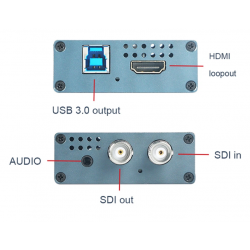
1.Connect input video to "SDI in" port.
2.Connect to PC by "USB output" port, or connect to an OTG
cable to cell phone.
3.If there is a audio input, connect to "audio in" port. And it
output HDMI and SDI signal to other devices.
4.When you using a software to capture video on PC, choose
"AFN Cap Video" and activate it.
5. LED status:
Input LED: no signal(flashing) got signal (light on)
Output LED: Not working(off) working (light on)
Input SDI signal via BNC female
Output USB3.0/BNC female/HDMI
Max video reolution 1920x1080 (1080p)
60FPS Frames per second max
Audio port 3.5mm
Working Temp. -20℃-65℃
OBS Player support
Windows/Linux /Android/MAC