Huge selection of cables and contacts - Sent from own stock

Cable / Fiber / Converter / Connector

One of DANBIT's main groups is cables. We offer all kinds of cables, ranging from network cables to IEEE 488 cables. In collaboration with our suppliers, we have the opportunity to tailor the various cables. Some tasks require angled plugs or lighter bends. At DANBIT we have the opportunity to help you. See all categories below. Do you have questions or did not find your desired cable? Then call us at 56 66 20 20 or send us an email at salg@danbit.dk

Cable / Fiber / Converter / Connector

Subcategories

  • Fiber cables
    <h2>General information about fiber cables</h2> <h3>Construction and application</h3> <p>Fiber cables are used for data transfer; serial communication, network, audio/video. Since fiber cables are made of nonconductive material, they do not transfer tension between the devices, they are therefore suitable in industry and as insulators for protection against lightning and other overvoltages.</p> <p><br /> There are two types of fiber cable for data communication: single mode and multimode.Both are made of transparent glass. Multimode cable typically reaches distances of up to 2 km while singlemode offers the largest distances between 10 and 100 km.<br /> <br /> The difference between singlemode and multimode is the thickness of the core. It is the thickness of the core that determines whether the cable is a multi or single mode. Multi-core cable core is typically between 50μm and 62.5μm and singlemode cables are typically around 9μm. Multimode is called OM1 at 62.5 / 125 and OM3 or OM4 at 50/125. Singlemode is called OS1. See further description on the next page.</p> <p></p> <p> </p> <h3>Cladding</h3> <p>Outside the core is a relatively thick insulation material called cladding (can be translated with "clothing") that acts as a mirror and holds the light inside the core. Outside is the buffer that protects the cladding. Then comes a layer of aramid fiber wire that adds the cable additional strength and ensures flexibility. Finally, one or more jackets will appear depending on whether the cable is used indoors or outdoors. </p> <p> </p> <h3>μm</h3> <p>50/125 means that the core is 50μm and the cladding is 125μm thick. Multimode cable type OM3 and OM4</p> <p>62.5 / 125 means that the core is 62.5μm and the cladding is 125μm thick. Multimode cable type OM19/125 means that the core is 9μm and the cladding is 125μm thick. Single-mode cable type OS1<br /> The outer diameter of the cable itself depends on the application. A patch cable is thinner than a grounding cable, as the latter is further protected against rodent and moisture. The Aramid fiber is a kevlar-like fiber material that is extremely flexible and strong.</p> <h3><br /> Common fiber optic:</h3> <p>LC (out of 1 cm mark). Approximately 11 mm wide for a duplex connector.<br /> Also seen as simplexadapter. SC (out of 4 cm mark). Looks like LC in construction and is often confused with this, but is somewhat larger: Approx. 21 mm wide for a duplex connector<br /> MTRJ connector (out of 7 cm mark). The connector is always duplex and can not be separated as LC and SC<br /> ST (out of 10 cm mark) is a bayonet type plug.</p> <p> </p> <h3>Differences between Single-and Multi-mode</h3> <p>In single mode, the light is sent more directly, why the range is greater. Single-mode fiber cables are available in 3 different polishing qualities and multimode fiber cables in 2 different polishing qualities. Polishing methods are called PC, UPC or APC. It is not possible to discern the different polishing methods, so in order to make it visible, the standard PC version the jack is black, and for UPC the jacket is blue and for APC that the jacket is green. PC is the one with the biggest loss, UPC is with medium loss and APC with the least loss. Multimode is available only as either PC or UPC, while singlemode is available in all 3 versions. DANBIT A/S stores both single-mode and multimode as PC versions, but the other types can be taken back to customers' wishes.</p>
  • Network cables
    <p>DANBIT is your professional supplier of high quality network cables. We supply network cables that have undergone extensive quality control.</p> <p></p> <p>With expertise in network cables and professional IT equipment, DANBIT has, for more than 40 years, manifested itself as the market's best and most reliable supplier. Try it for yourself.</p> <p></p> <p> </p> <h3>DANBIT has everything within network cables</h3> <p>If you are looking for specific network or internet cable types, colors or lengths, for example 30 meters red RJ45, category 6 or 20 meters screened category 7 network cable, DANBIT can deliver directly from stock.</p> <p></p> <p>We also supply category 6 network cables with 90 degree angle connectors, and category 6a network cables with light.</p> <p></p> <p> </p> <h3>Accessories for Network Cables / Network Cables</h3> <p>Whatever you are looking for in setting up a professional network, DANBIT is capable of delivering quality equipment - from one end of the network cable to the other end.</p> <p></p> <p>Internet connectors, access points, modems, network cards, print servers, routers and switches are just a small selection of our huge product range.</p> <p>We are proud to present DANBIT, as a Danish privately owned technology provider, which, since its founding in 1970, has been the Danish business community's preferred supplier of specialized products for professional solutions.</p> <p></p> <p> </p> <h3>Network cables and IT equipment</h3> <p>We have continuously expanded our product range from primarily consisting of electronic weighing equipment, to today consisting of more than 4000 special products, including quality network cables. Our network cables as well as most of our product range are imported from Taiwan, Hong Kong, China, Korea, Japan, USA and selected countries in Europe. DANBIT's extensive product range is continuously adapted to the needs, requirements and materials of the time.</p> <p></p> <p> </p> <p>We are always ready to guide you on your choice of network cables and solutions from DANBIT. If you also need additional specifications and information regarding our network cables, or other products from our large product range, you are welcome to contact us.</p> <p> </p> <p>During office hours, you can reach our Danish head office on telephone +45 56 66 20 20, and you are also welcome to send an e-mail</p>
  • Waterproof RJ45 / Fiber / USB /...
  • USB
    <h1><strong>Værd at vide om USB standarden</strong></h1> <p>USB hastigheder kan variere i forhold til afstand og enheder som bliver sat imellem. Men de forskellige standarders hastigheder kan findes herunder:<br />USB 3.0 op til 5Gbps<br />USB 2.0 op til 480 Mbps<br />USB 1.1 op til 12 Mbps<br />USB 1.0 op til 1,5 Mbps</p> <p></p> <p><img src="/img/cms/Forklaring%20om%20USB%2030%20teknologien/2016-02-17_10h14_43.jpg" alt="" width="683" height="592" /></p>
  • Thunderbolt
    <p>Thunderbolt is a new technology launched by Apple but is now also available on multiple Windows machines. Thunderbolt is a technology used to transfer data between devices. As we know from USB, but the difference is that Thunderbolt is faster - much faster. Are you comparing Thunderbolt with USB 3.0, which has a maximum transfer rate of 5.0 gigabits per second. second so that the thunderbolt 2 channels with a maximum transfer rate of up to 10 gigabits per second. second. <!-- P--></p> <p><!-- p--></p> <p><strong>Edification <!-- strong--> <!-- p--> </strong></p> <p>thunderbolt consists of 2 different compounds - DisplayPort (DP), and PCI Express. Display port is used to connect the various screens where PCI Express is used for fast data transfers. PCI Express can move data in both directions, which makes the connected devices can both send and receive data simultaneously.<strong> <!-- P--></strong></p>
  • HDMI
    <p><strong>HDMI</strong><br />HDMI is a standard in the transmission of video and audio signals. An HDMI cable makes it possible to transmit both full HD image and the digital surround sound sound 100% digital between a DVD player and a TV. Today, the HDMI standard is used in many types of multimedia devices, such as DVD and bluray players, gaming consoles, digital satellite receivers, flat screens and projectors. HDMI can also transmit images in full HD resolution as well as audio. <br /><br /><strong>HDMI Fiber</strong> <br /><br /></p> <p>With HDMI 2.1 optical fiber cable, you exceed the 10 meter limit. An optical fiber HDMI cable 2.1 breaks this limit without loss of image or sound quality. These fiber HDMI cables will replace the extender boxes previously used.</p> <p>The optical HDMI 2.1 with fiber supports the new eARC (Enhanced Audio Return Channel), which means that the sound quality is significantly improved and transmits Sorround 7.1. For it to work, it requires eARC to be supported in both the monitor and the device (the HDMI source). If the case is that the eARC is only supported at one end, the cable will automatically adapt to the ARC standard.</p> <p></p> <p>There is a network channel built into the HDMI cable, which allows a single ethernet connection to be shared between compatible devices. However, internet sharing will not work from a regular PC.</p> <p><img src="https://www.danbit.dk/img/cms/main-qimg-2347345cc07affd2f1866e2792681eb9-c.jpg" alt="" width="518" height="273" /><img src="https://www.danbit.dk/img/cms/main-qimg-7474f491b7783e83ea1553eb6bd8da94-c.jpg" alt="" width="400" height="273" /></p> <p>Regular HDMI cables use electricity to transmit signals. Fiber optic cables use laser. A fiber optic cable is much better quality than the standard HDMI cables we know. In addition, laser does not suffer from electromagnetic interference (EMI) or radio frequency interference (RFI), as electrical based cables do. As a result, fiber cables have significantly less signal loss and allow for greater distances than traditional HDMI cables.</p> <p></p> <p>However, please note that HDMI optical fiber cables are not bidirectional, so there will be "display" on one end and "source" on the other end.</p> <p></p> <p>HDMI connector types HDMI A is the standard HDMI connector used in virtually all electronics equipment today. Mini HDMI C Is a mini version of the HDMI A connector. The Mini HDMI C version is used in many newer HD camcorders. Micro HDMI D Is a micro version of the HDMI A connector. The Micro HDMI D version is used in many newer cameras.   <br /><br /><br />standards: <br />HDMI 1.0 <br />HDMI 1.1 <br />HDMI 1.2 <br />HDMI 1.2a <br />HDMI 1.3 <br />HDMI 1.3 <br />HDMI 2.0</p>
  • Displayport
    <p>In this category you will find our selection of DisplayPort cables. We offer DisplayPort to HDMI, Mini DP and USB. You can also get them with mechanical lock. With a DisplayPort cable, you can connect your computer and monitor screen. DisplayPort is NOT compatible with HDMI or DVI, here to use a converter. See the selection below. <!-- P--></p>
  • USB Extender
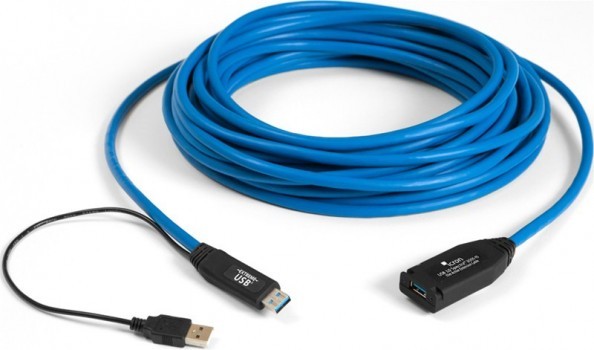
    <p>Here in the category you can find our USB Extender. With a USB Extender you can extend your USB connection. We extenders spanning 20 meters, depending on the type of USB you need. We have both USB 2.0 and 3.0. If you are unsure about product selection or else, you are always welcome to call in to our sales department. <!-- P--></p>
  • RS232 Serial / Parallel LPT
  • DVI
  • VGA
  • Coax cable / Antenne plug
    <p>The Coaxial cable was born in 1880 and is a type of electrical cable having an inner conductor surrounded by a tubular insulating layer, surrounded by a tubular conductive shield. <!-- P--></p> <p>All coax cables also has an insulating outer sheath or jacket. A coaxial cable is a transmission line used to carry high frequency electrical signals with low loss. It is used for broadband network cabling, cable television signals and connects the radio transmitters / receivers for their antennas. <!-- P--></p> <p>This is very important that a coaxial cable is made from high-quality materials, as 100% pure copper and that the tubular insulating material provides high isolation, and here is foam-isloator best. <!-- p--></p> <p>it is important that a coaxial cable is as short as possible as it works signaldæmpene. A coaxial cable for radio transmitters is 50 ohms - the resistance is called impedance and should be appropriate for the radio transceiver - opposite the device (eg. An antenna) must be designed with the same resistance. Possibly. mismatch will provide reflections of the cable and destroy / interfere with signal transmission. Video Signal transmission should the impedance is 75 ohm (RG59) <!-- p--></p> <p>A transmitter and receiver sees a coaxial cable which many complex passive components - capacity between conductor and shield, coils in series, and an ohmic resistance (loss in copper) . <!-- p--></p> <p><!-- p--></p> <p>a loss in a coaxial cable applies to both transmitter and receiver. A powerful coaxial cable for example. LLC400 (10mm thick) provides approximately 22dB loss per 100meters at 2.4GHz (WiFi). A LCC200 (5mm thick) gives a loss of some 100meters per 55dB at 2.4GHz. Remember to compensate Coax cable loss with passive Gain antenna if possible. Avoid any active 2-Wejs signal amplifiers. <!-- P--></p> <p><strong>Remember:</strong> Good quality cable offers the best connection. <!-- P--></p>
  • Adapter and Accessories
  • Angle connectors / cables
  • Loose sockets with jackets
  • Video and Audio cables
    <p>We offer a wide range of Audio, Video, Composit, XLR cables and adapters.<br />Special lengths and colors to order. Professional cables for the music industry in spelciel anymore.<br />Contact our sales department for special solutions regarding XLR cables and adapters</p>
  • External PC cables
  • Protection
  • Tools and accessories
  • SCSI
    <p>SCSI Cables &amp; Terminators.</p> <p></p> <p>SCSI is a bus technology that can be connected to "daisy Chained" allowing multiple scsi devices to be connected on the same bus . SCSI was really common back in the 80s and 90s. Typically, you could get a RAID controller and server with SCSI onboard. There are 3 types of SCSI devices available.</p> <p></p> <p></p> <ul> <li>Singel Ended SE</li> <li>Differential SCSI (HVD or Hig voltage differential)</li> <li>LVD Low Voltage differential.</li> </ul> <p></p> <p></p> <p>Connection is external or internal. Over time, there has been a development of the SCSI connectors, so today there are many different for speeds. Always always remember to Terminate the SCSI devices. Last unit on the SCSI bus.<br /> <!-- a--> <!-- p--></p> <p></p>
  • Industrial cables
    <p>At Danbit we always have a strong focus on industry and the current market demand. We make sure to constantly keep up and be up-to-date with our products and product groups. For example. offers Danbit many different cables for industry - including fiber and RJ45. <!-- P--></p> <p>To a cable must be able to cope in an industrial environment, it must tolerate plus and minus degrees, as well as wet and dry climate. All of our industrial fiber cables are steel reinforced which makes them incredibly hardy. Within our RJ45 cables visible cables are halogen-free and flame retardant. See the big selection. <!-- P--></p>
  • Power Cords
  • Intern PC cables
    <p>You can find our internal PC cables. The cables in this category are all some that are installed inside the computer itself, for example. HDD / SSD cables. <!-- P--></p> <p><!-- p--></p>
  • Flat cables, IDC, connectors
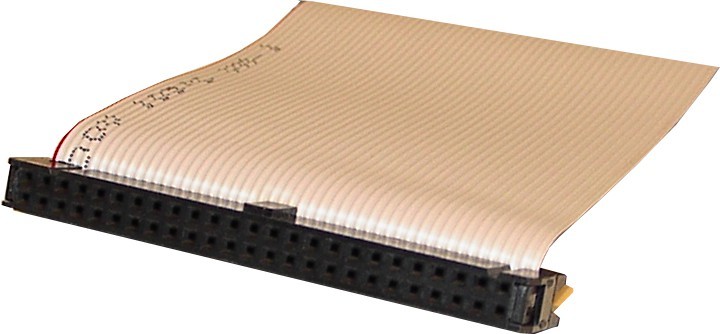
    <p>Flat cables are electrical cables characterized by multiple flat conductors placed parallel to each other, typically encased in an insulating film. Their low-profile and flexible nature makes them ideal for space-constrained or aesthetically sensitive applications. These cables are appreciated for their easy installation, low profile, and improved heat dissipation due to their larger surface area.</p> <p>IDC (Insulation Displacement Connector) connectors are specialized for connecting flat cables quickly and reliably by slicing through the insulation without prior stripping, facilitating a rapid and secure connection. They are widely used in computers, printers, and industrial machines due to their efficiency and reliability.</p> <p>The pitch in flat cables and IDC connectors refers to the distance from the center of one conductor to the center of the next. Typical pitch values for flat cables vary, but common sizes include 0.05 inches (1.27 mm), 0.1 inches (2.54 mm), and 1.0 mm. These pitch values are crucial for matching the flat cable with the correct IDC connector for a proper connection.</p> <p>The number of conductors in IDC connectors can vary significantly depending on the application. Typically, IDC connectors are designed to accommodate anywhere from a few conductors to over 50. More complex devices may require connectors with a higher number of conductors to accommodate multiple connections and higher power requirements. Choosing the right IDC connector with the appropriate number of conductors is essential to ensure the proper functionality and performance of the electronic device.</p>

There are 175 products.

Showing 169-175 of 175 item(s)

Join Our Newsletter

You may unsubscribe at any moment. For that purpose, please find our contact info in the legal notice.